2D Barcode Size & Quiet Zone Information
2D barcodes—also known as matrix barcodes—store information across two dimensions using a structured pattern of small squares, dots, or geometric shapes. Unlike traditional linear barcodes that encode data horizontally, 2D symbols utilise both horizontal and vertical axes, dramatically increasing their data capacity.
They can encode a wide range of information, including text, website URLs, serial numbers, and images.
Key Design Principle
In 2D barcode specifications, “X” represents the dimension (width or height) of the smallest individual square or dot within the symbol.
All measurements for quiet zones and margins are defined relative to this X-dimension.
Quiet Zone Requirements
-
QR Code: A quiet zone equal to 4 × X must be maintained on all four sides of the symbol. This ensures scanners can accurately detect the boundaries of the code.
-
Data Matrix: A quiet zone equal to 1 × X is required uniformly around the entire code. This clear space must remain free from any text, graphics, or background patterns.
Best Practices
-
Ensure quiet zones are printed in a light, uniform colour (typically white) and remain unobstructed by artwork, text, or packaging folds.
-
Avoid resizing the barcode image after export—this can distort the X-dimension and compromise readability.
-
Test printed samples using a GS1-compliant verifier before full production runs.
-
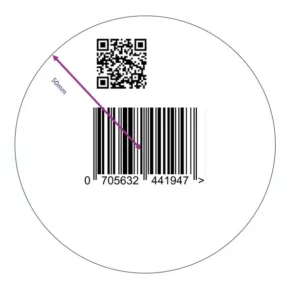
For dual-marked items (linear + 2D) the 2D barcode (including its quiet zone) should be placed within a 50 mm radius of the linear barcode centre to ensure the scanning system perceives them as the same trade item.
